In today's fast-paced business world, small and mid-sized businesses (SMBs) are losing thousands annually to accounting errors, missed invoices, and compliance failures. Surprisingly, this isn’t due to lack of effort, but because they’re using the wrong tools. Business accounting software in 2026 has evolved significantly—it's no longer just about digital bookkeeping. It’s AI-assisted, cloud-native, and deeply integrated with banking, payroll, and tax systems.
This guide is the definitive 2026 resource to help businesses understand which accounting software is right for them, providing a comprehensive look at the features that matter and offering an honest comparison between leading platforms.
However, the abundance of options leaves many businesses in a state of decision paralysis. With dozens of platforms competing for attention, choosing the wrong one can result in wasted migration time, retraining costs, and features that are either missing or underutilized.
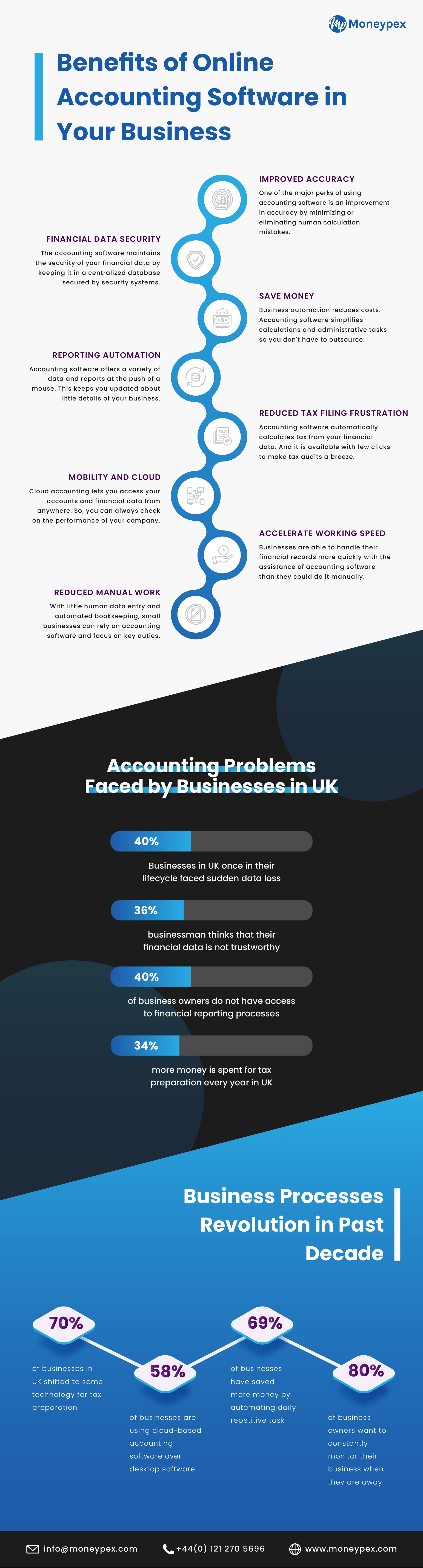
Why Choosing the Right Business Accounting Software Matters More in 2026
The Cost of Using the Wrong Accounting Software
While it may seem like a minor issue, using the wrong accounting software can have serious consequences:
-
Time Cost: Businesses waste hours on manual workarounds, duplicate data entry, and reconciliation errors when the software doesn’t fit the workflow.
-
Financial Cost: Missed tax deadlines, unclaimed expenses, and inaccurate P&L reports lead to poor business decisions and unnecessary fines.
-
Compliance Cost: With regulations like Making Tax Digital (MTD) in the UK, GST/VAT requirements globally, non-compliant software exposes your business to regulatory scrutiny.
-
Growth Cost: As your business expands, outgrowing basic accounting tools is inevitable. Migrating mid-year is expensive, disruptive, and risky.
What Has Changed in Business Accounting Software in 2026
The accounting software landscape in 2026 has dramatically shifted:
-
AI-powered transaction categorisation and anomaly detection have become standard in leading platforms.
-
Open banking integration allows for real-time bank feeds, eliminating the need for manual CSV imports from most major banks.
-
Embedded payroll and HR tools are now part of accounting suites, reducing the need for separate tools.
-
Increased focus on audit trails and e-invoicing mandates in the EU, UK, and APAC markets.
-
Mobile-first accounting: Full functionality is now available on smartphones, enabling business owners to manage their finances on the go.
What to Look for in Effective Business Accounting Software
Core Accounting Features Every Business Needs
Every business needs a solid foundation in accounting features:
- Double-entry bookkeeping engine for accuracy and auditability.
Bank reconciliation with live bank feed connectivity to avoid errors.
Invoicing and billing: Customisable templates, automated reminders, and recurring invoices.
Expense tracking and receipt capture: Ideally through mobile OCR for efficiency.
Chart of accounts flexibility and the ability to create custom journal entries.
Financial reporting: P&L, Balance Sheet, Cash Flow Statement, and aged debtors/creditors.
Advanced Features That Separate Good Software from Great Software
The right software will also offer advanced features that go beyond basic accounting:
-
Multi-currency support with automatic FX gain/loss posting for businesses with international operations.
-
Inventory and stock management integration to help product-based businesses.
-
Project and job costing to track profitability for service businesses.
-
Tax preparation and filing support for VAT, GST, MTD, and sales tax.
-
Role-based user access for secure accountant collaboration.
-
API and third-party integrations: Connect your CRM, payroll, e-commerce, and POS systems seamlessly.
Factors That Affect the Right Choice for Your Business
Several factors influence which software is best for your needs:
-
Business size: Whether you're a sole trader, SMB, or a growing multi-entity company.
-
Industry: The right tool varies by industry—retail, professional services, construction, hospitality, and e-commerce all have unique needs.
-
Geography: Local tax rules, compliance needs, and bank feed availability vary by country.
-
Budget: Balance between monthly subscription costs and total cost of ownership, including add-ons.
-
Technical comfort level: Some platforms require professional accountants, while others are owner-operator friendly.
Top Business Accounting Software Platforms in 2026 — Full Breakdown
1. Moneypex — Best All-in-One for SMBs and Accounting Firms
-
Overview: Moneypex is a cloud-based accounting suite that integrates invoicing, practice management, POS, and AML/KYC compliance.
-
Standout Features: Multi-currency, time tracking, client portal, AML compliance tools, localised support.
-
Best for: UK and international SMBs, accounting firms, businesses needing practice management alongside accounting.
-
Pricing: Competitive—contact for current plans.
-
Limitations: A newer platform with a still-growing ecosystem compared to established giants.
2. QuickBooks Online — Best for Feature Depth and Ecosystem
-
Overview: QuickBooks is a market leader with the deepest feature set and the largest third-party app ecosystem.
-
Standout Features: Advanced reporting, payroll integration, project profitability, inventory, tax centre.
-
Best for: Established SMBs with complex accounting needs, US-based businesses, and firms already embedded in the QuickBooks ecosystem.
-
Pricing: ~$30–$200/mo depending on tier—add-ons increase total cost.
-
Limitations: Price escalates quickly; customer support has been consistently criticized.
3. Xero — Best for Growing Businesses and Accountant Collaboration
-
Overview: Cloud-native platform with strong market presence in the UK, AU, and NZ, and excellent accountant tools.
-
Standout Features: Unlimited users on all plans, bank feeds, Xero HQ for accountants, 1,000+ integrations.
-
Best for: Growing SMBs, businesses with a dedicated accountant, multi-location operations.
-
Pricing: ~$15–$78/mo; entry plans have invoice limits.
-
Limitations: Payroll is an add-on; inventory is basic without third-party tools.
4. Zoho Books — Best Value for Feature-Rich Accounting
-
Overview: Part of the broader Zoho suite, offering deep functionality at a price point that undercuts most competitors.
-
Standout Features: 170+ currencies, workflow automation, client portal, project billing, GST/VAT compliance.
-
Best for: Budget-conscious SMBs, businesses already using Zoho CRM, and international businesses.
-
Pricing: Free plan available; paid from ~$15–$30/mo.
-
Limitations: UI less intuitive than Xero or QuickBooks; support response times can vary.
5. FreshBooks — Best for Freelancers and Service-Based Businesses
-
Overview: Invoicing-first platform evolved into a full accounting tool, strongest in service business workflows.
-
Standout Features: Time tracking, project management, client retainers, proposal and contract tools.
-
Best for: Freelancers, consultants, creative agencies, solo service providers.
-
Pricing: ~$19–$55/mo; client limits on lower tiers.
-
Limitations: Limited inventory; not suited for product-based businesses or complex accounting.
6. Wave Accounting — Best Free Option for Micro-Businesses
-
Overview: Free core accounting with paid add-ons for payroll and payments.
-
Standout Features: Unlimited invoicing, double-entry accounting, receipt scanning—all for free.
-
Best for: Sole traders, early-stage startups, micro-businesses with simple accounting needs.
-
Pricing: Free core; payroll from ~$20/mo; payment processing fees apply.
-
Limitations: Limited integrations; no inventory; support is paid; not suitable for businesses past basic complexity.
7. Sage Business Cloud Accounting — Best for UK Compliance and Established Businesses
-
Overview: Long-established platform with strong UK/EU compliance credentials and MTD readiness.
-
Standout Features: MTD VAT filing, cash flow forecasting, multi-currency, strong audit trail.
-
Best for: UK SMBs with compliance-heavy needs, businesses in regulated sectors, established companies.
-
Pricing: ~$10–$25/mo for entry plans; Sage 50 for larger businesses priced higher.
-
Limitations: Interface feels dated compared to newer cloud-native competitors; mobile app less capable.
Business Accounting Software Comparison Table — 2026 Top Picks
| Software | Best For | Free Plan | Multi-Currency | Payroll Included | MTD/VAT Ready | Starting Price (2026) |
|---|
| Moneypex | SMBs & accounting firms | No | Yes (150+) | Via integration | Yes | Contact |
| QuickBooks Online | Feature depth & US market | No | Yes (145+) | Add-on | Yes (UK) | ~$30/mo |
| Xero | Growing businesses | No | Yes (160+) | Add-on | Yes | ~$15/mo |
| Zoho Books | Best value | Yes | Yes (170+) | Via Zoho Payroll | Yes | Free–$15/mo |
| FreshBooks | Freelancers & services | No | Limited | No | Limited | ~$19/mo |
| Wave | Micro-businesses | Yes (core) | Limited | Add-on | No | Free |
| Sage | UK compliance | No | Yes | Add-on | Yes | ~$10/mo |
Expert Insights and Real-World Accounting Software Scenarios

Insight: The biggest mistake SMBs make is choosing accounting software based on price alone—the real cost is in the time lost to workarounds when the software doesn’t fit the workflow.
Case Study 1: A freelance consultant switching from spreadsheets to FreshBooks:
-
Problem: Spending 6+ hours per month on invoicing, chasing payments, and calculating quarterly tax.
-
Solution: FreshBooks automated invoicing, payment reminders, and expense categorisation.
-
Result: Invoice-to-payment cycle reduced from 21 days to 9 days; 5 hours per month reclaimed.
Case Study 2: A UK-based e-commerce SMB migrating from QuickBooks to Moneypex:
-
Problem: QuickBooks cost escalating with add-ons; needed practice management and AML tools alongside accounting.
-
Solution: Moneypex’s all-in-one suite replacing three separate tools.
-
Result: 30% reduction in software costs; single login for accounting, compliance, and practice management.
How to Switch Accounting Software Without Disrupting Your Business
-
Audit your current software — document what you use, what you do not, and what you are missing.
-
Define your non-negotiables: integrations, currencies, compliance requirements, user count.
-
Run a parallel trial — use the new software alongside the old for at least one full month.
-
Clean and export your data — chart of accounts, customer/supplier lists, opening balances.
-
Set a migration date aligned with your financial year-end or quarter-end.
-
Brief your accountant and any staff before go-live.
-
Reconcile opening balances on day one of the new system and verify against prior records.
Frequently Asked Questions (FAQs)
1. What is the best accounting software for small businesses in 2026?
Moneypex, Xero, and QuickBooks remain the top choices. Moneypex is ideal for businesses needing built-in manufacturing and inventory, while Xero and QuickBooks are preferred for general cloud accounting and extensive app integrations.2. Is free accounting software good enough for a growing business?
Usually not. While free tools work for startups, growing businesses eventually face limits on transactions, users, and features. Paid software is necessary for advanced needs like multi-currency, automation, and complex tax compliance.
3. Which accounting software is MTD compliant in the UK?
Moneypex, Xero, and QuickBooks are fully MTD-ready. They connect directly to HMRC, ensuring your VAT and Income Tax Self Assessment (ITSA) filings meet the 2026 digital requirements.
4. How do I migrate software without losing data?
Export your data (Chart of Accounts, Customers, Suppliers) into CSV files and use the new software's import templates. For safety, switch at the end of a financial period and keep a PDF backup of all historical reports.
5. What is the difference between accounting and bookkeeping software?
Bookkeeping Software: Focuses on recording daily entries, such as invoices and receipts.
Accounting Software: Includes bookkeeping but adds advanced analysis, financial reporting, tax compliance, and business forecasting.
Conclusion & Call to Action
In 2026, the best accounting software isn’t a luxury—it’s the operational backbone of a profitable, compliant, and scalable business. For more tips on financial management, check out our latest blog posts.
CTA: Start your free Moneypex trial today and experience all-in-one accounting built for modern SMBs, or request a POS demo to see how our hardware and software work together.